Changes | ||||||||
| Line: 8 to 8 | ||||||||
|---|---|---|---|---|---|---|---|---|
| ||||||||
| Added: | ||||||||
| > > |
| |||||||
Example Cases | ||||||||
| Line: 114 to 115 | ||||||||
d_top_of_hour integer, d_report_hour timestamp without time zone | ||||||||
| Changed: | ||||||||
| < < |
Note You must apply this database insert trigger for these columns to be active. | |||||||
| > > |
Note You must apply this database insert trigger and index for these columns to be active. | |||||||
| These two columns work together to label new observations as they are inserted with their d_report_hour and whether the new observation should be used for a top of the hour report(d_top_of_hour). The d_report_hour is associated with all observations a half hour before and after a given hour. So a d_report_hour of 12:00 would apply to all observations between 11:31 and 12:30. The d_top_of_hour indicator of '1' indicates that an observation is closest to the top of the hour among a group of observations for the same d_report_hour. Time comparisons between observations for the top of hour designation are made at the minute level, so 11:01:18 might be ignored for d_top_of_hour against an earlier 11:01:28. | ||||||||
| Line: 123 to 124 | ||||||||
-- JeremyCothran - 13 Dec 2025
| ||||||||
| Changed: | ||||||||
| < < |
| |||||||
| > > |
| |||||||
| ||||||||
| Changed: | ||||||||
| < < |
| |||||||
| > > |
| |||||||
| ||||||||
Changes | ||||||||||
| Line: 125 to 125 | ||||||||||
|---|---|---|---|---|---|---|---|---|---|---|
| ||||||||||
| Changed: | ||||||||||
| < < |
| |||||||||
| > > |
| |||||||||
| ||||||||||
Changes | ||||||||
| Line: 104 to 104 | ||||||||
|---|---|---|---|---|---|---|---|---|
multi_obs | ||||||||
| Changed: | ||||||||
| < < |
The following support columns have been added to the multi_obs table to support some common display needs. They are prefixed with 'd_' for 'display'. | |||||||
| > > |
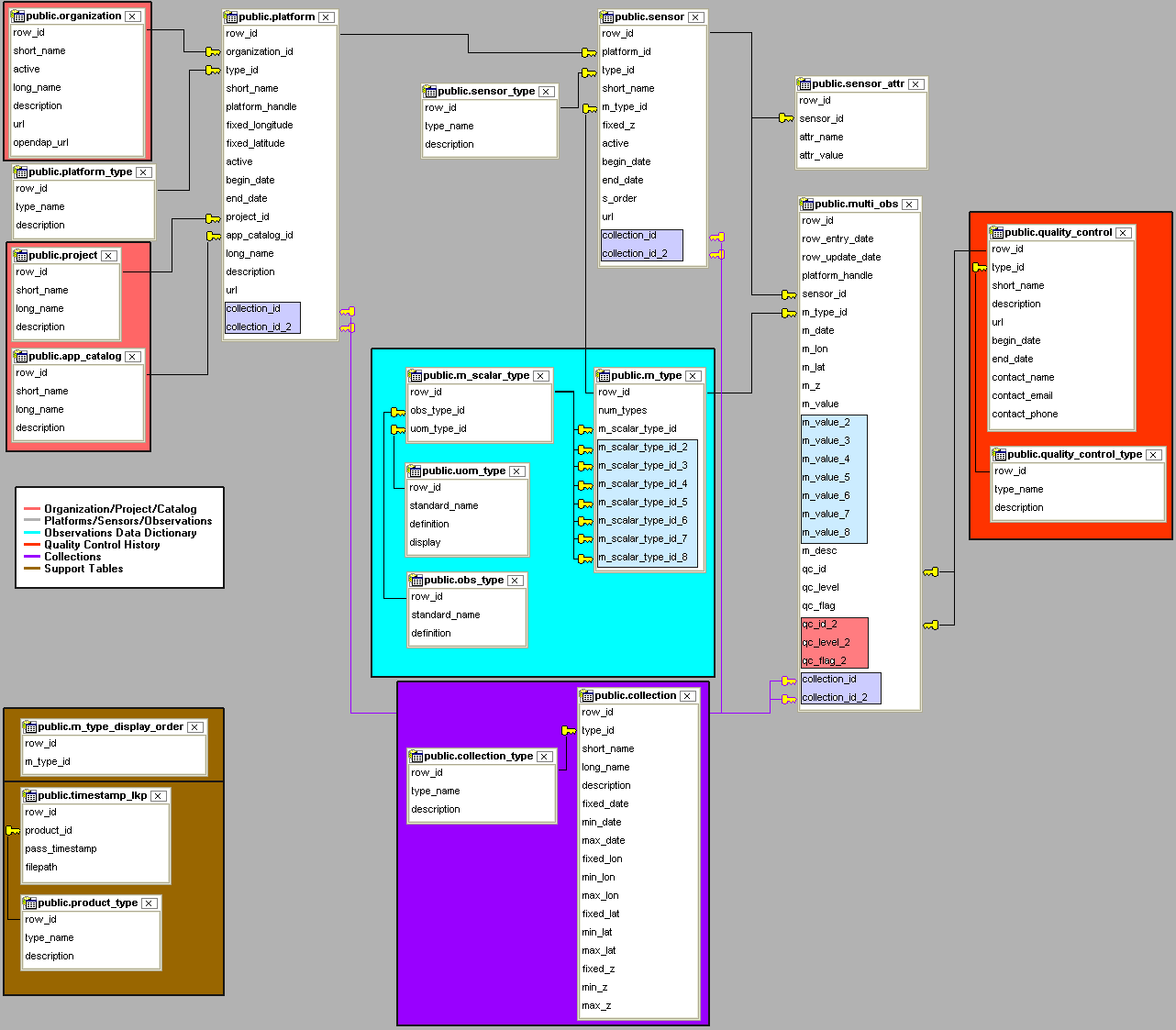
The following support columns have been added to the multi_obs table to support some common display needs. They are prefixed with 'd_' for 'display'. The are not currently pictured in the above schema diagram image but are part of the default schema sql download. | |||||||
| Note These columns are included with the version 2 schema, but if you are upgrading from something earlier and are missing these columns, the following alter sql statements should create the necessary columns. | ||||||||
Changes | ||||||||
| Line: 96 to 96 | ||||||||
|---|---|---|---|---|---|---|---|---|
| more documentation later | ||||||||
| Changed: | ||||||||
| < < |
Support Tables | |||||||
| > > |
Support Columns / Tables | |||||||
| Changed: | ||||||||
| < < |
An optional set of support tables to support display listing order(m_type_display_order) or keeping track timestamps(timestamp_lkp) for remote sensing products or other irregularly timed products. | |||||||
| > > |
An optional set of support tables to support display products, display listing order(m_type_display_order) or keeping track timestamps(timestamp_lkp) for remote sensing products or other irregularly timed products. | |||||||
| more documentation later | ||||||||
| Added: | ||||||||
| > > |
multi_obsThe following support columns have been added to the multi_obs table to support some common display needs. They are prefixed with 'd_' for 'display'. Note These columns are included with the version 2 schema, but if you are upgrading from something earlier and are missing these columns, the following alter sql statements should create the necessary columns.d_label_theta integerFor MapServer? directional font libraries, the direction is negative of the true direction(degrees from North), so 90 (degrees) becomes -90 for display purposes.d_top_of_hour integer, d_report_hour timestamp without time zoneNote You must apply this database insert trigger for these columns to be active. These two columns work together to label new observations as they are inserted with their d_report_hour and whether the new observation should be used for a top of the hour report(d_top_of_hour). The d_report_hour is associated with all observations a half hour before and after a given hour. So a d_report_hour of 12:00 would apply to all observations between 11:31 and 12:30. The d_top_of_hour indicator of '1' indicates that an observation is closest to the top of the hour among a group of observations for the same d_report_hour. Time comparisons between observations for the top of hour designation are made at the minute level, so 11:01:18 might be ignored for d_top_of_hour against an earlier 11:01:28. The d_report_hour label can be used to group observations within the same corresponding hour period(no need to repeat select by time interval code, just use observations with the same given d_report_hour label). Within a d_report_hour grouping the d_top_of_hour flag can be used to identify a single measurement point closest to the top of hour for all given sensor_id's. This can be utilized to produce an hourly 'top of hour' product such as a shapefile/map of sst, etc. | |||||||
-- JeremyCothran - 13 Dec 2025
| ||||||||
| Changed: | ||||||||
| < < |
| |||||||
| > > |
| |||||||
| ||||||||
| Added: | ||||||||
| > > |
| |||||||
Changes | ||||||||
| Line: 105 to 105 | ||||||||
|---|---|---|---|---|---|---|---|---|
-- JeremyCothran - 13 Dec 2025
| ||||||||
| Changed: | ||||||||
| < < |
| |||||||
| > > |
| |||||||
| ||||||||
Changes | ||||||||
| Changed: | ||||||||
| < < |
Changes to the schema from version 1 have been made to better support: | |||||||
| > > |
Changes to the schema from version 1 have been made to better support: | |||||||
| ||||||||
| Line: 28 to 28 | ||||||||
|---|---|---|---|---|---|---|---|---|
| ||||||||
| Added: | ||||||||
| > > |
Schema explanationVector datatype supportThis schema version describes all data as a vector, with the simplest case of a single scalar being a vector with only 1 component.Simple case, vector of 1 componentFor this simplest case, say air temperature in unit of measurement celsius(the specific row_id values are used just for example purposes):obs_type.standard_name = air_temperature , uom_type.standard_name = celsius m_scalar_type.row_id = 20 #identifies combination of obs_type = air_temperature uom_type = celsiusThe table m_type would reference this simple scalar by associating m_type.row_id = 30 m_type.num_types = 1 #a vector of 1 component m_type.m_scalar_type_id = 20 #referencing the scalar_type combo of air_temperature in celsiusAn inserted air temperature observation would be assigned the m_type = 30 with the value stored in the m_value field. multi_obs.m_type = 30 multi_obs.m_value = 19 #degrees celsiusSo multi_obs -> m_type -> m_scalar_type(s) -> obs_type(s) & uom_type(s) Vector of 2 or more componentsFor vectors with 2 or more components, the 2-8th component values would be stored in the light blue section of the multi_obs table schema in the same order as their individual listing on the m_type table. So 'wind_speed' might be referenced as a simple scalar, but 'wind' might be referenced as a combination of 'wind_speed,wind_from_direction,wind_gust'. The m_type table would define the 'wind' vector with those associated individual scalar types(wind_speed,wind_from_direction,wind_gust) in that specific order and expected listing in the multi_obs table.m_scalar_type.row_id = 100 #identifies combination of obs_type = wind_speed, uom_type = m_s-1 m_scalar_type.row_id = 243 #identifies combination of obs_type = wind_from_direction, uom_type = degrees_true m_scalar_type.row_id = 123 #identifies combination of obs_type = wind_gust, uom_type = m_s-1 m_type.row_id = 40 m_type.num_types = 3 #a vector of 3 components m_type.m_scalar_type_id = 100 #referencing the scalar_type combo of wind_speed in m_s-1 m_type.m_scalar_type_id_2 = 243 #referencing the scalar_type combo of wind_from_direction in degrees_true m_type.m_scalar_type_id_3 = 123 #referencing the scalar_type combo of wind_gust in m_s-1 multi_obs.m_type = 40 multi_obs.m_value = 5 #wind_speed in m_s-1 multi_obs.m_value_2 = 240 #wind_from_direction in degrees_true multi_obs.m_value_3 = 7 #wind_gust in m_s-1 Vectors can represent derived or support valuesThe m_type vector components need not reference only observations, they might also represent different units of measure of the same observation or other associated useful lookups derived from the observation. The m_type table as noted above might also list the same type observation in a variety of different vector components. The idea is for the vector support to provide a quick single table lookup to whatever table query is needed with the definition of the vector captured in the data dictionary support tables.Quality Control lookupsAn optional support table lookup to keep a history of associated quality control changes to data. more documentation laterCollectionsAn optional support table mechanism intended to support a collection or grouping of observations, sensors or platforms. more documentation laterSupport TablesAn optional set of support tables to support display listing order(m_type_display_order) or keeping track timestamps(timestamp_lkp) for remote sensing products or other irregularly timed products. more documentation later | |||||||
-- JeremyCothran - 13 Dec 2025
| ||||||||
Changes | ||||||||
| Line: 14 to 14 | ||||||||
|---|---|---|---|---|---|---|---|---|
| ||||||||
| Changed: | ||||||||
| < < |
| |||||||
| > > |
| |||||||
| ||||||||
| Line: 31 to 31 | ||||||||
-- JeremyCothran - 13 Dec 2025
| ||||||||
| Changed: | ||||||||
| < < |
| |||||||
| > > |
| |||||||
| ||||||||
Changes | ||||||||
| Changed: | ||||||||
| < < |
Changes to the schema have been made to better support: | |||||||
| > > |
Changes to the schema from version 1 have been made to better support: | |||||||
| ||||||||
| Changed: | ||||||||
| < < |
Examples Cases | |||||||
| > > |
Example Cases | |||||||
| ||||||||
Changes | ||||||||
| Line: 15 to 15 | ||||||||
|---|---|---|---|---|---|---|---|---|
| ||||||||
| Changed: | ||||||||
| < < |
| |||||||
| > > |
| |||||||
Source | ||||||||
| Changed: | ||||||||
| < < |
The postgresql sql source can be downloaded here | |||||||
| > > |
The postgresql sql source can be downloaded here and data dictionary population here | |||||||
| Xenia Table Schema version 2 | ||||||||
Changes | ||||||||
| Line: 32 to 32 | ||||||||
|---|---|---|---|---|---|---|---|---|
| ||||||||
| Added: | ||||||||
| > > |
| |||||||
Changes | ||||||||
| Line: 31 to 31 | ||||||||
|---|---|---|---|---|---|---|---|---|
-- JeremyCothran - 13 Dec 2025
| ||||||||
| Changed: | ||||||||
| < < |
| |||||||
| > > |
| |||||||
| Line: 1 to 1 | ||||||||
|---|---|---|---|---|---|---|---|---|
| Added: | ||||||||
| > > |
ChangesChanges to the schema have been made to better support:
Examples Cases
SourceThe postgresql sql source can be downloaded here Xenia Table Schema version 2
-- JeremyCothran - 13 Dec 2025
| |||||||
Revision r1.1 - 13 Dec 2025 - 23:01 - JeremyCothran
Revision r1.13 - 16 Feb 2025 - 16:21 - JeremyCothran
Revision r1.13 - 16 Feb 2025 - 16:21 - JeremyCothran