Main
Start of topic | Skip to actions
Some sample/example cases showing how to generate or style ObsKML from other sources.


This perl script makes an http request for the latest available observation data available from specific coastal USGS platforms in the southeastern(SEACOOS/SECOORA) states of NC,SC,GA and FL. The observation data is returned as column oriented ascii and used in the creation of an output ObsKML file. The specified platforms(and platform lookup data) can be easily changed to support other/additional USGS platforms of interest. The xml file is used as a lookup for the static platform information like longitude,latitude and description. I found the NOAA nowCOAST GIS application very helpful here as it allowed me to see and select water quality platforms into a table which made it easier to create the xml file used later.
This perl script takes an earlier produced xml file of latest observations from the Seacoos database and uses it to create an output ObsKML file.
This perl script takes this kml feed and appends ObsKML tags into the existing placemarks.
This perl script takes the xml file output from getService.php and converts to ObsKML. This xml file is used as a lookup for the static platform information like platform_type,longitude,latitude,description and time zone offset.
This perl script takes the xml file output from the SCDNR real-time feed for Kiawah, SC and converts to ObsKML. This xml file is used as a lookup for the static platform information like platform_type,longitude,latitude,description and time zone offset. Additionally this perl script is utilized to convert from an obskml file into the earlier required Seacoos netcdf fixed-point in-situ format convention.
to top
A simple example of using and styling ObsKML
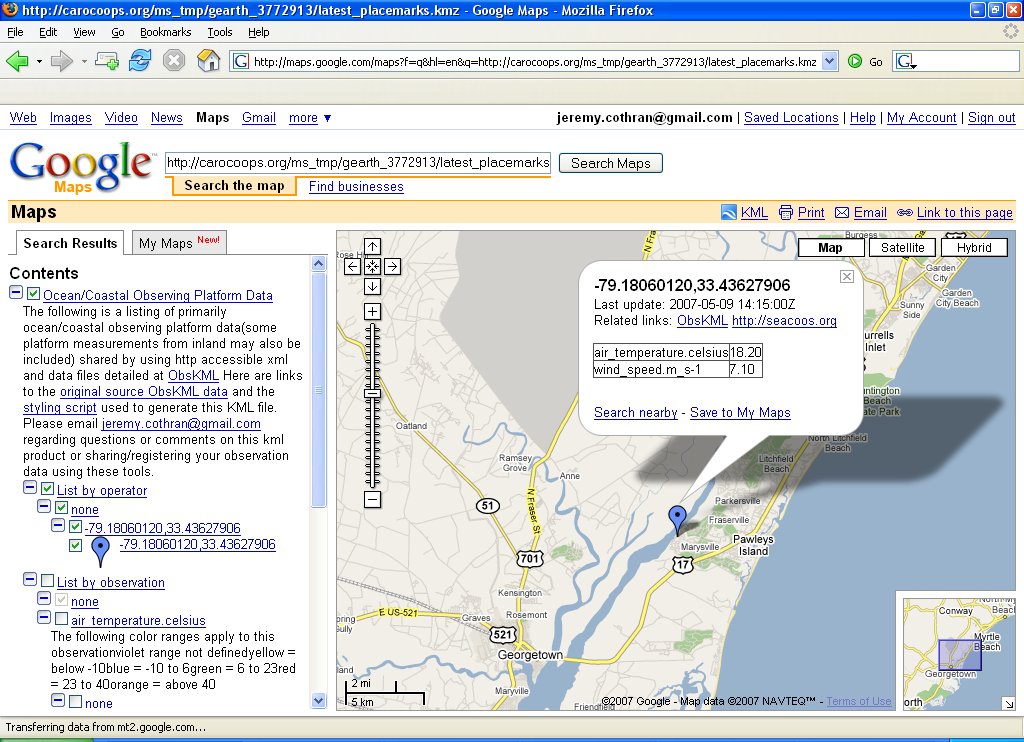
Consider the below simplest example ObsKML document which represents an air temperature and wind speed at a given platform location and time.
<?xml version="1.0" encoding="UTF-8"?>
<kml xmlns:kml="http://earth.google.com/kml/2.1" xmlns:obsList="http://carocoops.org/obskml/1.0.0/obskml_simple.xsd">
<!-- JTC - please forgive any unorthodoxy in the namespace declaration above, there's a bug with the perl XML::XPath package I'm using where all xmlns must be declared in the root element using prefix notation -->
<Document>
<name>Sample ObsKML</name>
<open>1</open>
<Placemark><Metadata>
<obsList>
        <obs>
                <obsType>air_temperature</obsType>
                <uomType>celsius</uomType>
                <value>18.20</value>
        </obs>
        <obs>
                <obsType>wind_speed</obsType>
                <uomType>m_s-1</uomType>
                <value>7.10</value>
        </obs>
</obsList></Metadata>
                <name>sample platform</name>
                <description>sample platform description</description>
                <Point>
                <coordinates>-79.18060120,33.43627906</coordinates>
                </Point>
                <TimeStamp><when>2007-05-09T14:15:00Z</when></TimeStamp>
                </Placemark>
</Document>
</kml>
Google Earth/Maps
By passing the above document's http address http://carocoops.org/obskml/feeds/sample/sample.kmz to the following script via the zip_data_url http argument, you'll be returned a styled kmz file for display in google earth http://carocoops.org/obskml/scripts/style_obskml.php?zip_data_url=http://carocoops.org/obskml/feeds/sample/sample.kmz or with the addition of http argument map=1 be returned a styled google map for smaller datasets(10's of platforms/placemarks) same as displayed in the image below. http://carocoops.org/obskml/scripts/style_obskml.php?map=1&zip_data_url=http://carocoops.org/obskml/feeds/sample/sample.kmz The way this works is the php page forwards the http arguments for the zip of source ObsKML files (zip_data_url) and a style_url (defaults to the settings at http://carocoops.org/obskml/scripts/style.xml ) to this perl script to return a styled kmz file.
A more complex example of using and styling ObsKML
Consider the below more descriptive ObsKML which adds the following attributes/elements- Placemark id attribute like operator_name.platform_name.package_name
- operatorURL
- platformURL
- platformDescription
- elev
- dataURL
<?xml version="1.0" encoding="UTF-8"?>
<kml xmlns:kml="http://earth.google.com/kml/2.1" xmlns:obsList="http://carocoops.org/obskml/1.0.0/obskml_complex.xsd">
<!-- JTC - please forgive any unorthodoxy in the namespace declaration above, there's a bug with the perl XML::XPath package I'm using where all xmlns must be declared in the root element using prefix notation -->
<Document>
<name>Sample ObsKML</name>
<open>1</open>
<Placemark id="carocoops.CAP1.wls"><Metadata>
<obsList>
        <operatorURL>http://carocoops.org</operatorURL>
        <platformURL>http://carocoops.org/carocoops_website/buoy_detail.php?buoy=WLS2</platformURL>
        <platformDescription>Carocoops CAP1 water level station</platformDescription>
        <obs>
                <obsType>air_temperature</obsType>
                <uomType>celsius</uomType>
                <value>18.20</value>
                <elev>3.0</elev>
                <dataURL>http://carocoops.org/carocoops_website/buoy_graph.php?buoy=WLS2&graph_type=air_temperature</dataURL>
        </obs>
        <obs>
                <obsType>wind_speed</obsType>
                <uomType>m_s-1</uomType>
                <value>7.10</value>
                <elev>3.0</elev>
                <dataURL>http://carocoops.org/carocoops_website/buoy_graph.php?buoy=WLS2&graph_type=water_temperature</dataURL>
        </obs>
</obsList></Metadata>
                <name>carocoops.CAP1.wls</name>
                <description>Carocoops CAP1 water level station</description>
                <Point>
                <coordinates>-79.68,32.86</coordinates>
                </Point>
                <TimeStamp><when>2007-05-09T14:15:00Z</when></TimeStamp>
                </Placemark>
</Document>
</kml>
The new information is utilized to provide better organization and forwarded links to the display like that produced from the following http call.
http://carocoops.org/obskml/scripts/style_obskml.php?map=1&zip_data_url=http://carocoops.org/obskml/feeds/sample/sample_2.kmz
Schema
An XML schema for the Metadata tag of this more complex display.Merging and styling several ObsKML documents
All together now
The single large(a little less than 1 MB) hourly data feed at http://carocoops.org/gearth/latest_placemarks.kmz merges the below separate ObsKML feeds for the latest observations from USGS, SEACOOS, VOS, NERRS, etc into one feed which has been styled to break observations out by operator and observation type. Merged and styled air temperatures are shown in the image below. The below image is visualized using Google Earth version 4.1.7076.4458 (beta May 6 2007) - if you get an error about timestamps, its probably related to using an earlier version. Merging of several ObsKML files is accomplished by passing a zipped file of several ObsKML files to this perl script which unzips each of the files and processes them into a hash which is then sorted and styled.
Other uses
- aggregations - take the above ObsKML fees and mix and match with your own at varying time steps and scales
- styling - style and restyle the ObsKML files (maybe using Yahoo Pipes ?) to your own useful visualization
- databases/archival/products - setup a XeniaPackage type relational table and utilize its existing time series, archiving and other products
- services - service/query enable the data feeds to other popular request mechanisms
Sample cases
The perl scripts below use the packages LWP::Simple to retrieve documents via HTTP and XML::LibXML (XML::LibXML documented here earlier) for XML parsing and processing. All of the below 'latest' ObsKML feeds are styled using this perl script and style lookup file to produce the corresponding 'latest styled' file which presents the observations available by platform or observation type and observation types having a simple color scale visualization.Generating ObsKML from ASCII(text) column data (USGS)
Water quailty observations from coastal USGS platforms in Southeast US (SEACOOS/SECOORA region of NC,SC,GA,FL) Data feeds latest latest styled day archive GenerationThis perl script makes an http request for the latest available observation data available from specific coastal USGS platforms in the southeastern(SEACOOS/SECOORA) states of NC,SC,GA and FL. The observation data is returned as column oriented ascii and used in the creation of an output ObsKML file. The specified platforms(and platform lookup data) can be easily changed to support other/additional USGS platforms of interest. The xml file is used as a lookup for the static platform information like longitude,latitude and description. I found the NOAA nowCOAST GIS application very helpful here as it allowed me to see and select water quality platforms into a table which made it easier to create the xml file used later.
Generating ObsKML from XML (SEACOOS)
Meteorological/Water observations from coastal/ocean platforms participating in the SEACOOS/SECOORA region Data feeds latest latest styled day archive GenerationThis perl script takes an earlier produced xml file of latest observations from the Seacoos database and uses it to create an output ObsKML file.
Generating/appending ObsKML into existing KML (VOS)
Meteorological/Water observations from ships participating in the NOAA VOS program via Destinsharks website kmz file Data feeds latest latest styled day archive GenerationThis perl script takes this kml feed and appends ObsKML tags into the existing placemarks.
Generating ObsKML (NERRS)
Meteorological/Water observations from the NERRS program via their web service. Data feeds latest latest styled day archive KML Network Links (auto-updated feeds once per hour) NERRS only National(includes NERRS) GenerationThis perl script takes the xml file output from getService.php and converts to ObsKML. This xml file is used as a lookup for the static platform information like platform_type,longitude,latitude,description and time zone offset.
Generating ObsKML (SCDNR)
Meteorological/Water observations from SCDNR program via their web service. Data feeds latest latest styled day archive GenerationThis perl script takes the xml file output from the SCDNR real-time feed for Kiawah, SC and converts to ObsKML. This xml file is used as a lookup for the static platform information like platform_type,longitude,latitude,description and time zone offset. Additionally this perl script is utilized to convert from an obskml file into the earlier required Seacoos netcdf fixed-point in-situ format convention.
Generating ObsKML (HF radar)
Not including the scripts for how I'm going from the original netCDF files to ObsKML for now, but can add if anyone is interested. Of greater interest to me is the variation of using ObsKML to describe a gridded field output like HF radar. The hourly hf radar kml files(kmz provided also) for Miami FL, Savannah GA and Outer Banks NC are available at http://trident.baruch.sc.edu/kml The three regional files produced start umiami... (miami), seacoos_savannah...(savannah) and nccoos...(outer banks) Not sure when Tampa FL will be back online, will include that region when it comes back up more complete/stable. The script that produces the files runs every 25 minutes past the hour, so new files should be available around 30 minutes past the hour. Files over two days old are automatically deleted from the system. Current values over 6 knots are removed from the files as erroneous also. The Miami and Savannah kml files are hourly indexed - the Outer Banks data is a little different in that the timestamps for the placemarks vary across a several hour period, so users will want to fix their time window to an hour or so when viewing to get the temporal aspect with that region. The Miami data is fairly predictable with the gulf stream moving closer or further to shore, Savannah gets more interesting with the tides, coastal gyres and Charleston 'bump' area http://www.oceanexplorer.noaa.gov/explorations/islands01/log/sep27/sep27.html and Outer Banks is interesting with the intersection and deflection of the warm water gulf current and cold water labrador current as they effect tropical storms/hurricanes http://www.usatoday.com/weather/tg/wcapehat/wcapehat.htm.Convert from ObsKML to other formats
Converting to the Seacoos netCDF fixed-point in-situ format
Converting from an ObsKML file to the Seacoos netcdf convention (detailed at http://seacoos.org/documents/metadata ) is shown in this perl scriptConvert from ObsKML to CSV
This perl script converts from the latest hourly ObsKML files to an hourly CSV file at http://carocoops.org/obskml/feeds/all_latest.csv.zipConvert from ObsKML to shapefile
The below three cron commands hourly produce a zipped set of shapefiles located at http://carocoops.org/obskml/feeds/all_latest_shapefile.zip from the CSV file.7 * * * * /usr2/local/gdal/gdal-1.2.6/bin/ogr2ogr -f "ESRI Shapefile" /var/www/html/obskml/feeds /var/www/html/obskml/feeds/all_latest.csv 9 * * * * /usr2/local/gdal/gdal-1.2.6/bin/ogr2ogr -f "ESRI Shapefile" /var/www/html/obskml/feeds /var/www/html/obskml/feeds/all_latest.vrt >> /tmp/obskml.log 2>&1 11 * * * * cd /var/www/html/obskml/feeds ; zip -m all_latest_shapefile.zip all_latest_shapefile.* >> /tmp/obskml.log 2>&1
Convert from ObsKML to other services
Of the OGC specs I use WMS(Web Mapping Service) and WFS(Web Feature Service), but in my opinion the other more recent specs past that seem not be worth the effort at this time because they are still very much experimental in nature with complexity/security/performance issues which may need to be worked out or evolve into something else. On the other hand, we do have other community folks at http://oostethys.org that are working with the OGC SOS spec and this perl script demonstrates how to create the necessary support files(sos_config.xml,data files) from ObsKML files on a regular basis which can be used in conjunction with the oostethys 'cookbook' scripts to setup an OGC SOS service. Note the script requires pathing information(at the top of the script) to be configured. This approach facilitates breaking the problem down more between providing data(push/report) and serving data(pull/query) - instead of having to implement and maintain a service at each data provider, a data aggregator or data assembly center could pull in various ObsKML files and provide a single service on top of that aggregation.to top
| I | Attachment | Action | Size | Date | Who | Comment |
|---|---|---|---|---|---|---|
 | obskml_all_latest.jpg | manage | 208.6 K | 17 May 2025 - 17:39 | JeremyCothran | na |
| | sample_obskml.jpg | manage | 205.0 K | 17 May 2025 - 20:51 | JeremyCothran | na |
| | sample_2.jpg | manage | 190.0 K | 29 May 2025 - 17:51 | JeremyCothran | na |
 | process_obskml_netcdf.pl.txt | manage | 3.9 K | 07 Aug 2025 - 18:37 | JeremyCothran | na |
Edit | Attach image or document | Printable version | Raw text | More topic actions
Revisions: | r1.14 | > | r1.13 | > | r1.12 | Total page history | Backlinks
Revisions: | r1.14 | > | r1.13 | > | r1.12 | Total page history | Backlinks